What is InMail on LinkedIn? a 2026 guide to messaging beyond connections
Clear LinkedIn strategy for people publishing with purpose.

On this page
- The three main ways to use inmail
- Inmail vs regular messages: a response rate comparison
- How to write inmails that actually get a response
- Calculating your inmail ROI and credit management
- Why inmail works better when paired with strong content
- Mastering LinkedIn inmail for better outreach
- Frequently asked questions
- What is the difference between LinkedIn inmail and a regular message?
- How many inmail credits do I get with sales navigator?
- Can you send a follow-up inmail if they don’t reply?
- Do inmail credits roll over to the next month?
- What happens to my inmail credit if the recipient replies?
- How long should my inmail subject line be?
- What is a ‘free InMail’?
You’ve found the perfect prospect: a VP who could actually buy what you’re selling. One problem, you’re not connected, and a cold connection request feels like a coin flip. So what is InMail on LinkedIn, exactly? It’s a paid messaging feature that skips the connection requirement entirely, letting you land straight in someone’s inbox even if you’ve never interacted before.
That’s what makes InMail such a workhorse for serious outreach. It puts decision-makers within reach, no mutual connections or awkward intro requests needed.
This guide breaks down what InMail actually costs, how credits get allocated, and how to make it work on mobile, where most of your prospects are actually reading.
The three main ways to use InMail

You get three main ways to send an InMail on LinkedIn, and each fits a different goal. Standard InMails are what most people mean: you use LinkedIn Premium, Sales Navigator, or Recruiter Lite to message someone you’re not already connected with. You pay with credits, and you pick the target. If you’re a recruiter reaching out about a specific job, or a salesperson trying to start a conversation, this is your tool.
Sponsored InMails (now called Message Ads) are paid messages that show up in a user’s inbox as an ad. You can target by industry, job title, or company size, and send the same message to a whole list. If you want to promote a webinar or push a product launch, this is built for scale. Just know: users see these as ads, so response rates are usually lower than one-on-one InMails.
Open Profiles are a bit of a hack. Some Premium members let anyone message them for free, even if you don’t have credits or a paid plan. You’ll see an “Open Profile” badge on their profile. If you’re networking on a budget, always check for these before burning an InMail credit.
Comparing InMail to regular messages: regular messages only work with your first-degree connections. InMail gets you past that wall, but you pay for the reach. If you’re trying to pitch a stranger, InMail is your route. If you just need to follow up with someone you already know, stick with regular messages.
Here’s when each method works best:
- Standard InMail: Targeted, personal outreach (recruiting, sales, partnerships)
- Sponsored InMail: Broad campaigns, event invites, brand promotion
- Open Profile: Free outreach to Premium members who opt in
If you’re not sure which tool fits your goal, check what kind of response or result you actually need, one good reply often beats a hundred unread ads. For more on LinkedIn tools, see How to add a resume to LinkedIn: step-by-step guide for 2026.
InMail vs regular messages: a response rate comparison
If you want more replies on LinkedIn, start with regular messages to people you already know. Those pull 25-35% response rates with your connections. Think colleagues, past clients, or anyone you’ve already chatted with. People are simply more likely to answer when they recognize your name.
InMail is LinkedIn’s premium tool for messaging people you’re not connected to. It’s the paid option for cold outreach, great for sales, recruiting, or pitching when you don’t have a mutual connection. The catch: response rates drop to 10-15% since you’re a stranger landing in their inbox. Still, InMail actually outperforms classic cold email or phone calls by a lot, scoring about 2.6 times more replies than those old-school tactics.
Here’s the tradeoff: InMail costs extra (usually on a monthly plan or pay-per-message), while regular messages are free with your network. For warm leads or ongoing relationships, stick with regular messages, they’re cheaper and more effective. Save InMail for cold prospecting, when you need to break the ice with someone new and can justify the price for a better shot at a reply.
For more LinkedIn tips, check out how to find your LinkedIn URL on any device.
How to write InMails that actually get a response

If you want your InMails to actually get a response, you need to stand out fast and respect the reader’s time. Here’s how to do it right, plus a few common traps to avoid.
Keep subject lines short (mobile matters)
Most people check LinkedIn on their phones. Long subject lines get chopped off. Stick to under 40 characters for your InMail subject line. For example, “Quick question about your team” shows up in full, while “I’d love to connect and discuss partnership opportunities” gets cut mid-thought. Short wins.
Use the ‘hybrid outreach sequence’
Don’t just fire off a single InMail and hope for the best. Combine a connection request with a follow-up InMail over a 14-day window. Start with a personalized connect note. If they don’t reply, send your InMail a few days later referencing your earlier attempt. This layered approach feels less spammy and boosts reply odds.
Time it right, avoid the ‘friday slump’
Weekends kill response rates. Most people check LinkedIn mid-week. Send your InMails Tuesday through Thursday, ideally in the late morning. Skip Fridays unless you like getting buried.
Personalize the first line, ditch AI spam vibes
Open with something specific to the recipient. Mention a recent post they wrote, a project they led, or a mutual connection. “Saw your talk at SaaStr, great take on onboarding churn!” lands better than “Hope this message finds you well.” If your first line looks generic, people assume it’s automated and hit delete.
Focus on their pain, not your pitch
Talk about a challenge they might have, not your product’s features. For example: “Noticed your team is hiring SDRs, are you running into pipeline gaps this quarter?” This shows you’ve done your homework and care about their problems. Nobody wants a cold sales brochure.
Have an ‘InMail recovery strategy’
If someone ignores or declines your message, don’t keep hammering. Instead, add them to a nurture list. Maybe engage with their posts, or share something genuinely useful a few weeks later. Sometimes, a light touch builds trust for the next attempt.
Here’s the bottom line: Every InMail should feel like a one-on-one conversation, not a blast. Keep it short, personal, and relevant. That’s how you get replies.
Calculating your InMail ROI and credit management
Getting a handle on your InMail ROI means looking at both the costs and the lead value you get from LinkedIn Sales Navigator. Here’s how you can think it through without any guesswork.
Start by figuring out your cost-per-lead. Let’s say LinkedIn Sales Navigator Core runs you about $99/month. If you close one deal a month from InMail outreach and that deal is worth $2,000, your cost-per-lead is pretty clear. But if you send out 20 InMails, get 5 responses, and close 1 deal, you’re looking at $99 for those 20 touches. That’s $19.80 per response and $99 per closed deal. If your closed deal value is in the thousands, that math works out in your favor.
InMail credits are where things get a little more tactical. Each Sales Navigator tier gives you a set number of credits per month, Core includes 50. You use one credit for each InMail you send to someone you’re not already connected with. If you get a response (any reply, even “not interested”), LinkedIn refunds that credit within 90 days. That means you’re not penalized for starting real conversations.
Watch your credit rollover: Some plans let you carry unused credits into the next month, but not all. With Sales Navigator Core, unused credits roll over for up to 3 months, after that, they expire. So if you’re holding onto a stack of credits, know that you can’t bank them forever.
Quick summary:
- Monthly cost: What you pay for your Sales Navigator plan.
- Lead value: How much a closed deal is worth to you.
- Credits per month: 50 on Core, with rollover for 3 months.
- Refunds: Get a credit back if you get a response within 90 days.
If your cost-per-lead is low compared to what you actually close, you’re in the green. If not, tighten your targeting or message. Simple as that.
Why InMail works better when paired with strong content
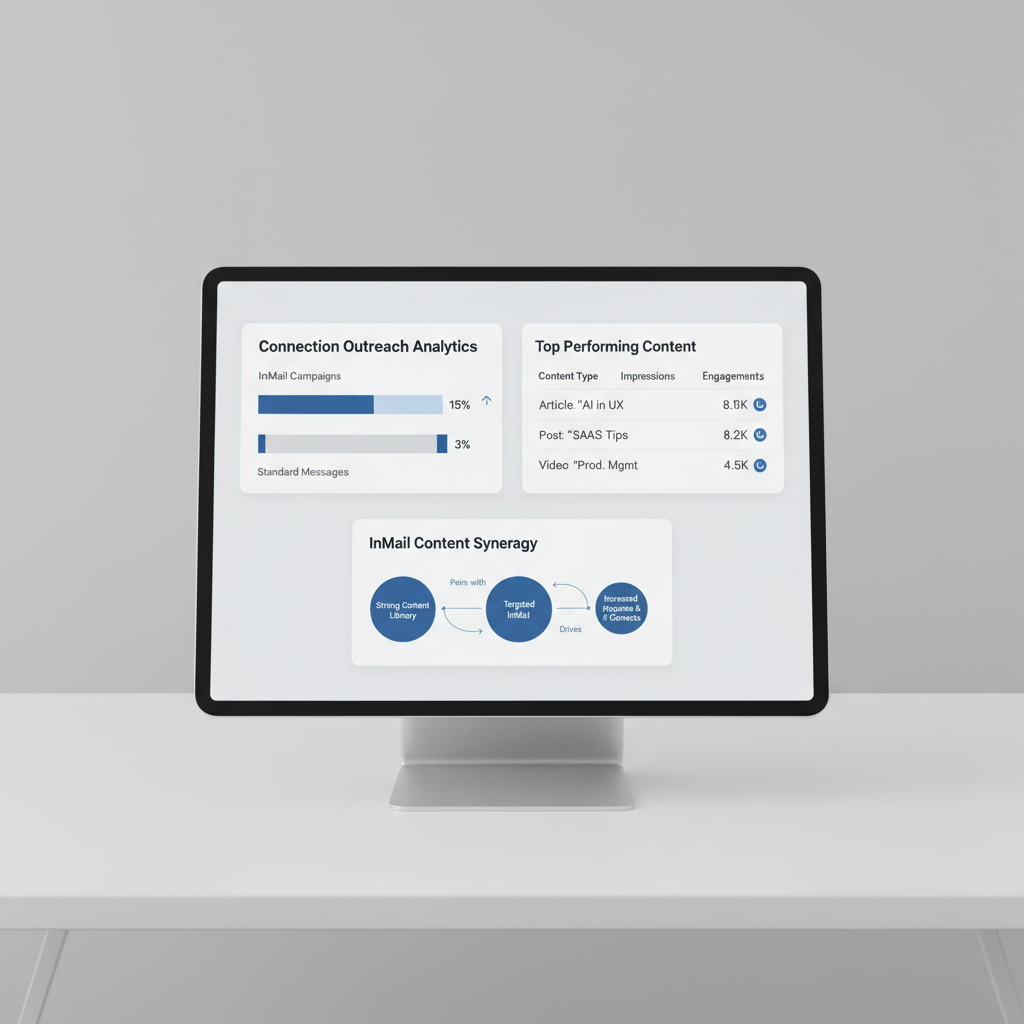
InMail gets real traction when your name actually means something to the person you’re messaging. If someone sees your posts in their LinkedIn feed every week, you’re not a stranger pitching out of nowhere. You’re the voice they already associate with smart takes on their industry. That’s the difference between getting ignored and getting a reply.
Consistent posting does the heavy lifting for you here. The more you show up with useful or original content, the more likely people are to recognize your name, and trust it. Over time, this routine is what actually helps you generate consistent inbound leads. People reach out to you, not just the other way around.
Here’s a concrete scenario: Say you send a LinkedIn InMail to a VP at a target company. If she’s seen your posts pop up on her feed twice in the last month, your message feels like a continuation of a conversation, not a cold pitch. That context warms up your outreach, making your InMail far more likely to convert.
But there’s a catch. If your posts sound like every other AI-generated blurb, you’ll blend in with the noise. That’s why using AI tools that keep your unique voice intact is critical. Postwriter is built for this. It helps you create LinkedIn content that actually sounds like you, not a template. When your posts are recognizable and authentic, your profile stands out. That authority is what moves your InMails from the “ignore” pile to the “let’s talk” pile.
You can keep up with posting, sound like yourself, and make your outreach work harder, all by pairing InMail with strong, personal content. Postwriter handles the content side, so your LinkedIn strategy does more than just cold pitch. It builds a pipeline that works both ways.
Want to see how it fits? Check out Postwriter – LinkedIn Content That Sounds Like You.
Mastering LinkedIn InMail for better outreach
LinkedIn’s InMail is basically a paid backstage pass. It lets you message anyone on the platform even if you’ve never connected, which is the whole reason sales teams and recruiters pay for LinkedIn Premium, Sales Navigator, or Recruiter in the first place. Regular messages only work between connections. InMail skips that requirement entirely, for a price.
That price is where most people trip up. Every InMail costs a credit, and credits are not free or unlimited, they’re bundled into your plan and capped monthly. Send a generic “checking in” message to a VP of Sales and burn one of maybe ten credits for the month, and you’ve spent real money on something a cold email could’ve done for nothing.
Credits vs. quality: the real tradeoff
Treat every InMail like a paid ad, not a text message. You’re not just writing a note, you’re spending a finite resource on a single shot at someone’s attention.
Here’s what that means in practice:
- Personalize the opener. Reference their recent post, a shared connection, or a specific role change, not a template greeting.
- Keep it short. Most InMail gets opened on a phone first, so a message that reads like a wall of text on desktop turns into an unreadable block on mobile.
- Front-load the ask. Put your reason for reaching out in the first two lines, because that’s often all a mobile preview shows before someone decides to swipe away.
- Skip the attachments and heavy formatting. They render inconsistently on mobile and make an already-precious credit feel even riskier.
Compare a template blast (“Hi, I’d love to connect regarding an opportunity”) against a tailored line like “Saw you just moved into a Head of Growth role after leading demand gen at your last company. Curious how you’re thinking about pipeline for Q1.” One reads like spam. The other reads like someone actually did their homework, and that difference is what separates a wasted credit from a real conversation.
Start with your profile, not your message
None of this matters if your profile can’t back up the message you’re sending. Before you spend a single credit, pull up your own profile the way a stranger would see it: is your headline just a job title, or does it say what you actually help people do? Is your photo recent and professional? Does your About section give someone a reason to reply?
Run through your LinkedIn profile checklist before you touch InMail credits. A tightened profile makes every message that follows land harder, because the person you’re messaging is going to click through and check you out within seconds of reading your pitch. Get that part right first, then let InMail do what it’s built for: getting a real message in front of someone who’d never see it otherwise.
You may also find Cancel LinkedIn premium in 2026: step-by-step guide, refunds, and what changes useful. For more, see How to see scheduled posts on LinkedIn: the complete guide for effortless content management | Postwriter.
Frequently asked questions
What is the difference between LinkedIn InMail and a regular message?
A regular message can only be sent to people you are already connected with. InMail is a premium feature that allows you to message anyone on the platform, even if you don’t have a first-degree connection. This makes InMail a powerful tool for cold outreach and prospecting.
How many InMail credits do I get with sales navigator?
The number of InMail credits depends on your specific subscription tier. While standard Premium accounts offer a set amount, Sales Navigator typically provides a higher allocation of monthly credits to support intensive prospecting and effective prospect list building.
Can you send a follow-up InMail if they don’t reply?
Yes, you can send follow-ups, but you should be strategic. Using a ‘Hybrid Outreach Sequence’, combining a connection request, a regular message, and then an InMail, is often more effective than spamming multiple InMails to the same person.
Do InMail credits roll over to the next month?
This depends on your plan. Standard LinkedIn Premium subscriptions generally do not allow credits to roll over, whereas certain Recruiter-level accounts may offer different credit allocation rules. Always check your specific subscription settings in 2026.
What happens to my InMail credit if the recipient replies?
LinkedIn typically rewards successful engagement. If a recipient replies to your InMail, your credit is often refunded to your account, allowing you to use it for another prospect. This encourages high-quality, relevant messaging.
How long should my InMail subject line be?
While the technical limit is higher, you should aim for brevity. Because many users view LinkedIn on mobile, subject lines are often truncated. Keep your subject line short and intriguing to ensure the full context is visible on a smartphone screen.
What is a ‘free InMail’?
You can send ‘free’ InMails to members who have an ‘Open Profile’ enabled. If a user has this setting turned on, Premium members can message them without consuming their monthly InMail credit allocation.
Turn this into a LinkedIn post
Use Postwriter to turn a topic, source, or rough idea into a draft that keeps your voice and gives you something worth editing.
See how Postwriter works