How to write a LinkedIn post that gets engagement in 2026
Clear LinkedIn strategy for people publishing with purpose.
On this page
- Why some LinkedIn posts get replies
- The engagement-first post framework
- How to write posts people respond to
- Post types that fit engagement goals
- Common mistakes that kill engagement
- A faster workflow for consistent posting
- How to know if your post worked
- Write for replies, not applause
- Frequently asked questions
- How do you write a LinkedIn post that gets engagement?
- What should the first line of a LinkedIn post be?
- How long should a LinkedIn post be for engagement?
- What types of LinkedIn posts get the most comments?
- Should I use hashtags on LinkedIn posts?
- How often should I post on LinkedIn?
- Can AI write good LinkedIn posts?
- How do I measure LinkedIn engagement?
- Related reading
On this page
- Why some LinkedIn posts get replies
- The engagement-first post framework
- How to write posts people respond to
- Post types that fit engagement goals
- Common mistakes that kill engagement
- A faster workflow for consistent posting
- How to know if your post worked
- Write for replies, not applause
- Frequently asked questions
- How do you write a LinkedIn post that gets engagement?
- What should the first line of a LinkedIn post be?
- How long should a LinkedIn post be for engagement?
- What types of LinkedIn posts get the most comments?
- Should I use hashtags on LinkedIn posts?
- How often should I post on LinkedIn?
- Can AI write good LinkedIn posts?
- How do I measure LinkedIn engagement?
- Related reading
Learning how to write a LinkedIn post that gets engagement comes down to three clear elements. You need one specific reader, one clear tension, and a simple reply path.
A high-performing post cuts out corporate buzzwords and stays well within the 3,000-character platform limit. It shares a concrete, real-world example and invites a fast reply before the reader scrolls past.
“I changed my client kickoff call after a $20,000 project went sideways” beats “Communication is important” every time.
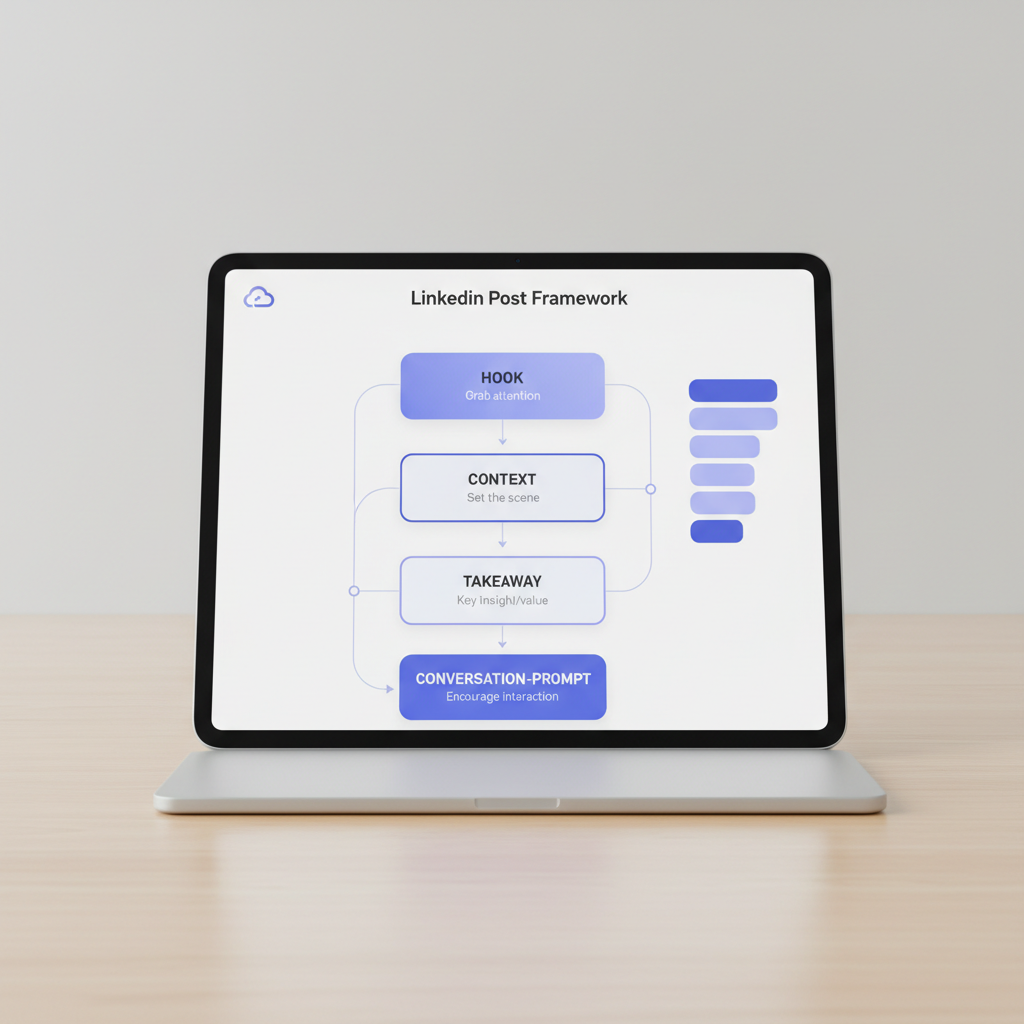
This guide shows you how to write posts that spark real workplace conversations without sounding like a corporate press release.
Why some LinkedIn posts get replies
Attention is not the same as engagement
Posts get replies when they give readers a concrete claim to challenge, refine, or validate. A safe, generic update earns quiet nods, but it rarely produces active comments.
Weak posts sound interchangeable. They claim that “Consistency matters” or “Leadership requires trust.” While true, these generic statements lack friction, specific details, or a defined point of view.
A stronger post takes a firm operational stand: “I stopped asking my engineering team for daily standups. It forced everyone to perform busyness instead of shipping code.”
That statement introduces immediate friction. Readers can agree, disagree, or compare it to their own team sprint rhythms.
Posting 5 times a week will not fix bland writing. If your content is practical, timely, and specific to the reader, it will spark an active thread.
Your voice matters more than polish
Clean grammar helps readability, but a distinct voice makes content memorable. If every sentence reads like an executive briefing, readers will keep scrolling.
Your natural voice shows up across three core areas:
- Tension: a specific operational mistake, tradeoff, or hard lesson.
- Usefulness: a practical step the reader can test within 10 minutes.
- Personality: the direct, conversational phrasing you use in direct messages.
“I lost a $20,000 contract on the final 30-minute call because I skipped discovery” works far better than “Sales requires thorough preparation.” You do not need manufactured drama. You need an honest, defensible perspective.
Comments need an easy opening
Strong posts lower the barrier to comment. They avoid forcing readers to write a 500-word essay or guess what you are asking.
Ending a post with “Thoughts?” usually fails. It forces the reader to do all the creative heavy lifting. A focused prompt gives them an immediate entry point: “Have you ever cut a 60-minute recurring meeting and seen team velocity improve?”
Make the reply path low-friction. Ask about a specific tradeoff, a tooling preference, or an early career mistake. When a reply takes less than 30 seconds to type, your comment volume climbs.
The engagement-first post framework
Audience before angle
Define your exact reader before you draft your angle. Targeting “professionals on LinkedIn” creates vague copy. Targeting “engineering leads running their first sprint retrospective” instantly clarifies the problem.
Strong posts address one person facing one messy operational challenge. The reader recognizes their exact situation before deciding to participate in the comments.
Use this operational structure:
- Audience: First-time engineering managers.
- Problem: Performance reviews feel adversarial.
- Opening hook (first 140-210 characters): “The first time you tell a direct report their work missed the mark, your stomach drops.”
- Practical takeaway: Separate the project standard from the personal flaw.
- Closing prompt: “What phrase made tough feedback easier for you to deliver during 1-on-1s?”
This structure delivers immediate value. Broad platitudes about leadership invite zero replies because they lack actionable detail.
One idea per post
Cover one point thoroughly instead of cramming five concepts into a single update. A single LinkedIn post cannot replace an entire operating manual.
Pick one specific workflow or belief to examine, then stay focused on it. If your post focuses on handling client scope creep, avoid adding tips on invoicing, contract negotiation, and hiring subcontractors.
Structure your copy with these five steps:
- Open with an immediate observation or tension.
- State the operational problem plainly.
- Deliver one clear, actionable solution.
- Add concrete proof from your own work.
- Close with a single, targeted question.
Weak: "Great managers communicate clearly, build psychological safety, and run efficient meetings."
Better: "I cut our weekly pipeline review from 60 minutes to 15. We review the blockers sheet first, then disconnect."
Specific tactical choices beat generalized summaries every time.
A reply-friendly ending
End with a prompt that readers can answer instantly from memory. You do not need a complex philosophical debate. You need a low-friction prompt:
- “What do you say first during a difficult kickoff call?”
- “Which tool did your team drop this quarter: Slack, Jira, or Loom?”
- “Which step takes longer for you: writing the 500-word draft or editing the fluff?”
If an ending demands deep analysis, most readers keep scrolling. If it asks for a single concrete detail, they leave a comment.
How to write posts people respond to
Start with a specific workplace scenario rather than a broad subject. Choose who you want to engage, identify what they struggle with daily, and give them a prompt they can answer quickly.
Step 1: Define the target peer (e.g., solo consultants struggling with client boundaries).
Step 2: Isolate the core friction (e.g., answering client texts at 9 PM).
Step 3: Draft a hook that cuts off before line 3 (under 140-210 characters on mobile).
Step 4: Provide the 3-step rule you used to resolve the issue.
Step 5: Add a concrete limitation (e.g., this rule fails during critical system outages).
Step 6: End with a direct question on their boundary rules.
- Pick one clear reader: Target a real role, such as a B2B sales director reviewing pipeline accuracy. One specific reader sharpens your vocabulary.
- Name the active friction point: Replace “project management is tough” with “your team agreed on the scope, but the client added three new requests over Slack this morning.”
- Write the opening line like a conversation: Draft an opener you would message a colleague: “I spent three years over-delivering on projects before realizing it was killing our 35% profit margin.”
- Supply context before steps: Show the setup before presenting the solution. Tips without context read like shallow advice.
- Include concrete details: Share what failed, what changed, or what rule you adopted. Mention actual tools, 14-day timelines, or team handoff points.
- Keep formatting scannable: Format for mobile devices with short paragraphs (1 to 3 sentences) and clean line breaks. You can format drafts using the LinkedIn Post Formatter – Free Text Formatting Tool | Postwriter.
- Eliminate buzzwords: Remove empty phrases like “synergy” or “value-add.” State the actual operational action taken.
- End with a focused question: Ask for a single data point, preference, or past experience to encourage rapid replies.
Post types that fit engagement goals
Use stories for trust
Story posts demonstrate your practical judgment during real business situations. They do not require an entire career history, just a distinct moment where a process broke down or an assumption failed.
A functional story follows four beats:
- The initial situation.
- The breakdown or unexpected obstacle.
- The adjustment you made.
- The operating rule you follow now.
Limitation: Personal story posts build authority, but they do not generate immediate sales pipeline on their own. Avoid them when your sole objective is technical documentation or direct feature walkthroughs.
Contrarian stories work well when grounded in evidence:
- Constructive tension: “Most onboarding checklists help HR file paperwork, but leave the new hire unable to push code for 14 days.”
- Engagement bait: “Everything you know about hiring is wrong.”
Use how-to posts for usefulness
How-to posts generate high bookmark rates and detailed replies. They offer immediate utility, which makes them ideal for building professional credibility.
Break down a recurring task into clear, numbered stages:
- Target outcome: “Drafting a weekly sprint summary in under 10 minutes.”
- Execution steps: “List shipped items, list active blockers, link the staging environment.”
- Concrete example: “Replace ‘working on backend’ with ‘auth API completed; pending database migration.'”
- Rule of thumb: “If a blocker requires another team, tag the lead directly in line 1.”
Limitation: How-to posts deliver high bookmark counts, but they often yield fewer comment threads than debate-driven posts. Pair your tactical steps with a question about alternative workflows to keep comment numbers high.
Use questions with restraint
Standalone questions succeed only when your network is already invested in your perspective. Asking broad questions without context makes the post feel like assigned homework.
Frame questions around a tangible tradeoff:
Weak: "What is your favorite leadership book?"
Strong: "When hiring your first product manager, do you look for an ex-founder or a domain specialist?"
Limitation: Standalone question posts can feel low-effort if used more than once every two weeks. Anchor your questions inside valuable observations rather than publishing bare prompts.
Common mistakes that kill engagement
| Mistake | Immediate Fix |
|---|---|
| Press release opening | Lead with the problem solved, not the launch announcement. |
| Multi-topic clutter | Split 5 distinct ideas into 5 separate posts. |
| “Thoughts?” ending | Ask about one specific tradeoff or tool. |
| Unedited AI drafts | Inject your own numbers, mistakes, and team tone. |
| Wall-of-text formatting | Break lines every 1 to 3 sentences for mobile screens. |
1. Don’t open like a press release
Opening with “We are thrilled to announce” signals corporate marketing. Readers instantly swipe past self-serving announcements.
Open with the problem your announcement solves. Detail the customer headache, the production failure, or the operational limitation that forced the update.
2. Don’t cram every thought into one post
Trying to cover strategy, hiring, tooling, and quarterly performance in 1,200 characters dilutes your core message.
If a draft contains three distinct conclusions, split it into three separate posts. One sharp idea consistently drives deeper comment discussions than a sprawling summary.
3. Don’t end with a dead question
Prompts like “Agree?” or “Let me know your thoughts” generate poor engagement. They signal that the author ran out of ideas and put the creative burden on the reader.
Tie your closing prompt directly to the scenario you described: “What is your hard cutoff rule when a client asks for weekend revisions?”
4. Don’t copy viral formats without a point of view
Templates provide formatting structure, but they cannot replace subject-matter expertise. Replicating viral hooks without firsthand experience creates hollow content that hurts credibility.
Use frameworks to organize your thoughts, but ground every post in your own metrics, tooling decisions, and team workflows.
5. Don’t let AI flatten your voice
Raw language model output often defaults to predictable adjectives and repetitive structures. Unedited AI posts damage your credibility quickly.
Always edit AI drafts to reflect your actual speech patterns, add real-world data points, and cut filler.
If you generate drafts using Postwriter’s LinkedIn Post Generator, treat the result as a baseline draft. Edit the phrasing until it matches your authentic voice.
Skip the blank-page problem. Postwriter helps you draft LinkedIn posts in your own voice, schedule content, publish directly to LinkedIn, and review performance without juggling five tools. Try Postwriter →
A faster workflow for consistent posting
A reliable publishing workflow relies on capturing insights throughout your workday rather than staring at a blank screen on Monday morning.
Keep a single capture note in your workspace (such as Notion, Apple Notes, or Obsidian) containing:
- A client question from an afternoon call.
- A workflow bottleneck resolved in your team chat.
- A counterintuitive finding from a recent 30-day campaign.
- A disagreement from a weekly team sync.
Use structured drafting to turn rough notes into published content:
Capture Raw Note -> Outline Hook & Core Takeaway -> Format for Mobile -> Schedule
Postwriter speeds up this process by training on your historical posts to match your natural writing style while eliminating generic social media phrases.
Format your text cleanly before scheduling. Ensure the hook fits cleanly inside the first 3 lines (approximately 140 to 210 characters) before the mobile “see more” cutoff button.
Schedule posts across consistent weekly windows (for example, Tuesdays, Wednesdays, and Thursdays at 8:00 AM local time). Batching 3 to 4 posts per week prevents last-minute, rushed publishing.
Track your numbers weekly to spot patterns:
- Which hooks produced the highest click-through to “see more”?
- Which topics attracted comments from qualified buyers or industry peers?
- Which post structures drove profile visits within 24 hours?
Calculate your numbers accurately with the LinkedIn Engagement Rate Calculator – Free Tool | Postwriter to evaluate what resonates without guessing.
How to know if your post worked
Measure against yourself
Evaluate your posts against your historical performance baselines rather than comparing your account to large creator profiles.
Review these key metrics across your dashboard:
- Qualified comments: Replies from target buyers, peers, or industry specialists.
- Organic reposts: Unprompted shares that expose your work to new networks.
- Profile visits: Increases in profile traffic within 24 hours of publishing.
- Connection requests: Inbound requests referencing the specific topic you covered.
If your standard post receives 5 reactions and zero discussion, generating 4 detailed comments from your target demographic represents significant progress.
Look beyond reactions
Likes and claps are low-effort reactions. A post can generate 100 likes from a basic meme while driving zero business inquiries.
Prioritize comment depth over reaction counts:
- Did readers share their own technical approaches?
- Did peers challenge your conclusions with detailed counter-arguments?
- Did prospects ask follow-up questions about your methodology?
High-quality comments provide market research that informs your next 3 drafts.
Turn winners into patterns
Document successful posts inside a swipe file while the analytics are current.
Track these assets:
- The exact hook structure (first 2 lines).
- The core operational topic.
- The closing conversation prompt.
- The comments that surfaced new angles.
Postwriter tracks these performance patterns directly, making it easy to create follow-up posts based on your highest-performing angles.
Write for replies, not applause
Writing high-performing LinkedIn posts requires clear targeting rather than complex writing.
Focus on one reader, one friction point, and one actionable takeaway:
Vague approach: "Leaders must build a personal brand to succeed in modern business."
Targeted approach: "A bootstrap founder posts 5 feature updates weekly, but gets zero comments because the copy never shows how customers use the tool."
Write directly to an individual peer. Keep your language conversational, clear, and grounded in real work.
Draft your next post today: select one operational mistake from your past month, state the exact fix you applied, and ask your audience how their team handles the same bottleneck.
You can also test your media assets using the Free LinkedIn Image Downloader – Download Post Images | Postwriter and check scheduling history with the Free LinkedIn Post Date Extractor – Extract Publication Dates | Postwriter.
Frequently asked questions
How do you write a LinkedIn post that gets engagement?
Pick one specific audience, address a single operational challenge, and write in your natural voice. Open with a compelling hook under 210 characters, deliver a practical takeaway, and close with a low-friction question that is easy to answer from memory.
What should the first line of a LinkedIn post be?
The first line should highlight a clear friction point, surprising data point, or direct realization. Keep it under 140 to 210 characters so readers see the entire premise before the “see more” cutoff on mobile screens.
How long should a LinkedIn post be for engagement?
While LinkedIn allows up to 3,000 characters per post, focused posts between 800 and 1,500 characters often perform best for readability. Cut any sentence that does not directly advance the core premise.
What types of LinkedIn posts get the most comments?
Posts covering real-world case studies, contrarian operational lessons, and practical teardowns consistently generate comments. They provide concrete details that readers can debate, validate, or compare against their own experience.
Should I use hashtags on LinkedIn posts?
Limit hashtags to 1 to 3 relevant tags placed at the end of the post. Avoid cluttering your text with inline hashtags, which make copy harder to scan on mobile devices.
How often should I post on LinkedIn?
Publishing 3 to 4 well-developed posts per week delivers steady results without exhausting your audience. Consistency and quality beat daily posts that rely on shallow filler.
Can AI write good LinkedIn posts?
AI tools speed up brainstorming, outlining, and drafting, but unedited drafts often lack authentic perspective. Review every AI output to add personal experiences, concrete metrics, and your natural tone.
How do I measure LinkedIn engagement?
Track qualified comments, unprompted reposts, profile views, and inbound inquiries rather than relying solely on reactions. Compare these numbers against your 30-day baseline to evaluate what content drives business value.
Related reading
- How to use LinkedIn emojis without looking unprofessional
- LinkedIn post character limit: how to write posts that actually get read
- How to post a promotion on LinkedIn in 2026: the exact steps
- How to use LinkedIn bold text safely without tanking your reach
- What is a coding post? technical APIs and developer writing guides
- What is a carousel post? (2026 definition, formats, and strategy)
- Linkedin post size: exact 2026 dimensions and specs guide
- Linkedin text formatter: how to use bold and italics without breaking SEO
Turn this into a LinkedIn post
Use Postwriter to turn a topic, source, or rough idea into a draft that keeps your voice and gives you something worth editing.
See how Postwriter works